
Import and export
Este artículo todavía está en inglés. La guía inicial y las instrucciones para crear un webhook ya están disponibles en español.
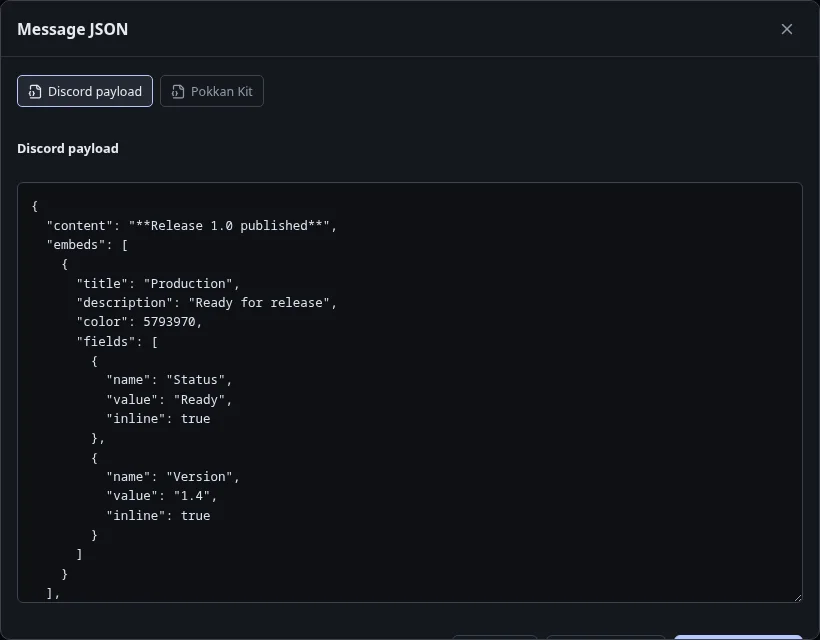
The editor’s JSON action is also its export tool. There is no separate Export menu.
Choose the right format
Section titled “Choose the right format”- Discord Payload: message data for Discord. It does not include the Kit name, arguments or Placeholder catalog. Validation can block export until errors are fixed.
- Pokkan Payload: a portable Kit, including the message and supporting Kit data. Use this for a backup or to continue editing later.
Choose Copy or Download after selecting the format. Copy requires browser clipboard permission; download is an alternative if clipboard access is denied.
Import a copy
Section titled “Import a copy”Open Kits, choose Import, enter a name, and paste your JSON. Import creates a new Kit rather than replacing another one. In an existing editor, Apply JSON changes that Kit; review your changes before saving.
Unsupported component data can remain in a Pokkan Kit, but Discord Payload omits components Pokkan cannot serialize. Read validation warnings rather than assuming both exports contain identical data.
Never include a webhook URL in JSON. The delivery credential belongs only in Send.
Next: Kits and drafts · Placeholders