
Understand the editor
Este artigo ainda está em inglês. O guia inicial e as instruções para criar um webhook já estão disponíveis em português.
The message preview is the editing surface. You do not need to switch to a separate builder.
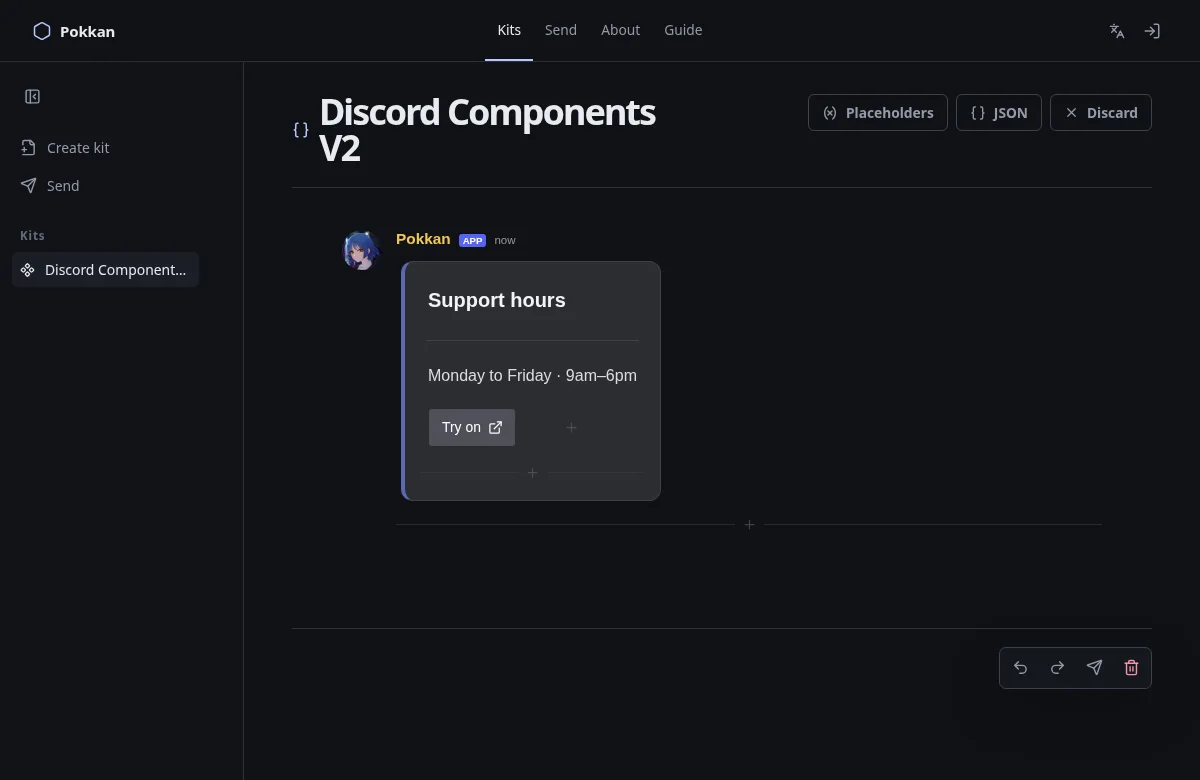
- Text: click or tap it to edit. Formatting controls appear for fields that support formatting.
- A component: select its surface to reveal its small action group. Configure opens less frequent properties; color and emoji controls are available on the component where applicable.
- A plus between items: adds content at that location. A plus inside a parent adds a child to that parent.
- Drag handle: moves items where the format permits it. Discord fixes the major categories of a Legacy message, so not every surface can move anywhere.
- Undo/redo: use the dock or the familiar keyboard shortcuts.
- JSON: inspect, copy, download or apply message data.
- Send icon: opens the sending page with this Kit selected. It does not send immediately.
On a phone, the Kits button opens the sidebar over the editor. Choose a Kit or dismiss the sidebar to recover the whole screen width.
If a plus is missing, that position may have reached its Discord limit or need a different component type. Validation explains incomplete structures. An unfinished Section needs both text and an accessory.
Next: Add an embed →